Food Stamp Office Login: SNAP Account Access & Help Guide
There is no single national food stamp office login for every SNAP user. Use this guide to find your state SNAP portal, sign in safely, apply, renew, upload documents, check notices, and avoid fake login pages.
Quick Answer: Where Is the Food Stamp Office Login?
The correct SNAP login depends on your state. USDA/FNS does not process SNAP applications or case questions directly. To log in, apply, renew, upload documents, check messages, or get EBT help, choose your state from the official USDA SNAP applicant/participant page or SNAP State Directory, then use your state’s official benefits portal.
No single national SNAP login
SNAP is federal, but account login, applications, renewals, notices, document upload and case access are managed by state or local agencies.
Choose your state first
Use USDA/FNS to choose your state, then follow the official state SNAP website, benefits portal, or local office instructions.
Avoid fake login pages
Do not enter Social Security numbers, EBT card numbers, PINs, case letters, or identity documents on unofficial pages.
Open the USDA SNAP applicant/participant page, choose your state, then sign in only through your official state benefits portal. If you already have a notice, use the portal link or phone number printed on that notice.
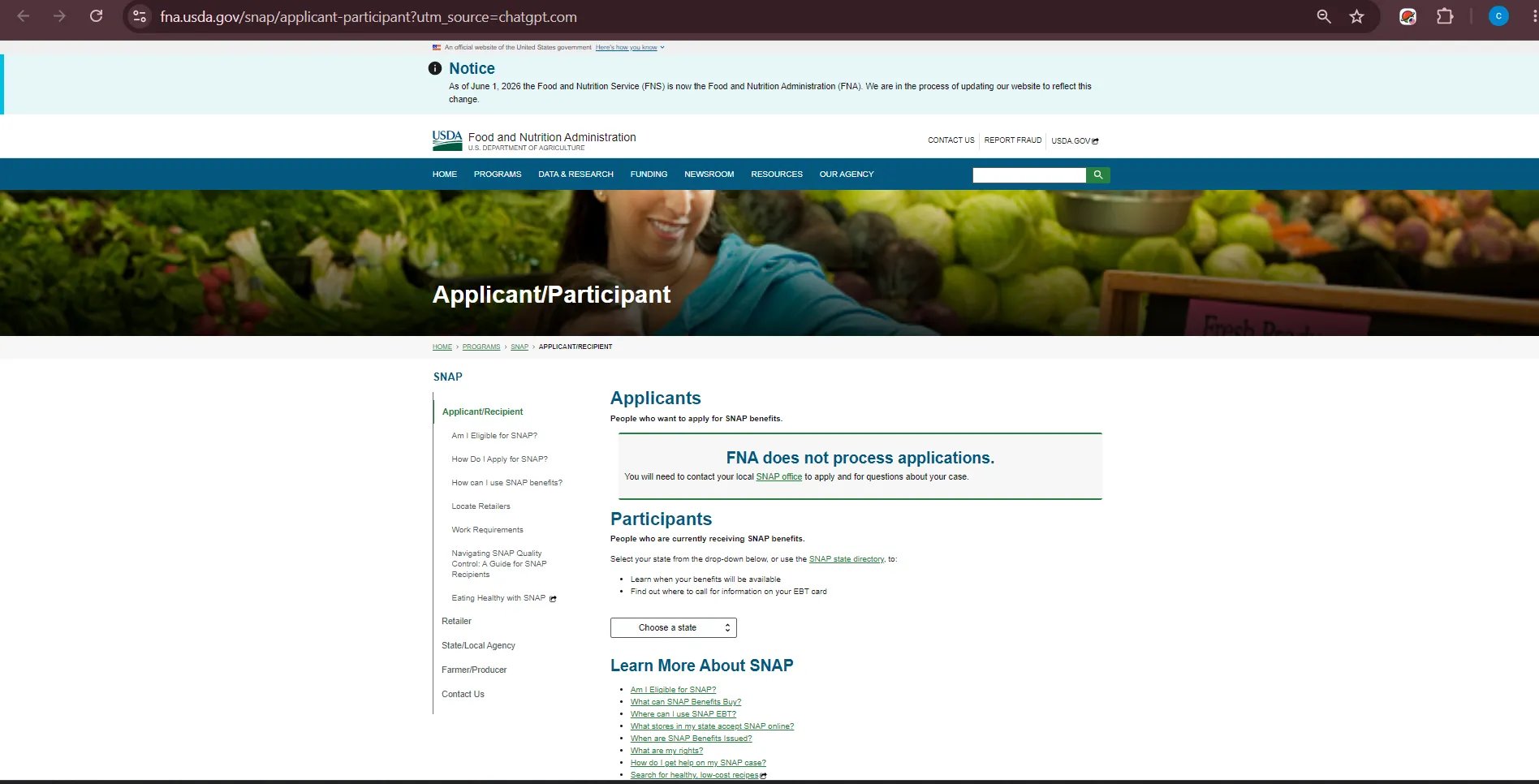
Official Site Screenshot: SNAP Applicant & Participant Login Route
The screenshot below shows the official USDA/FNS SNAP applicant and participant route. Use it to find your state account access, EBT information, benefit schedule, application page, and local SNAP office contact route.
How to use this official page
Open the official USDA/FNS applicant and participant page, choose your state, then follow the state SNAP website or portal link. Use that official state portal for login, applications, renewals, document upload, case messages, benefit notices, and EBT information.
Food Stamp Office Login Finder: Choose the Right Account Route
Pick what you need. This tool gives a safe action route without collecting your personal details.
Open the official USDA SNAP applicant/participant page, choose your state, then use your state’s official SNAP or benefits portal.
What You Can Usually Do After SNAP Account Login
Exact portal features vary by state, but most state benefits accounts are built around the same user tasks: apply, renew, upload documents, read notices, report changes, and check benefit information.
| Account task | Where to do it | Important safety note |
|---|---|---|
| Apply for SNAP online | Official state benefits portal or state SNAP application page. | Application methods vary by state; never pay to apply. |
| Renew or recertify | State portal, mailed notice, local office, or state-approved submission route. | Use the deadline on your official notice. |
| Upload documents | Official state portal, upload tool, office, fax, mail or approved drop-box route. | Keep confirmation numbers, receipts, fax proof or upload screenshots. |
| Check case status | State portal, notice phone number or local SNAP office. | Independent websites cannot view your private SNAP case. |
| Check EBT balance | Receipt, official EBT app/website, state portal or EBT customer service. | Never enter your EBT PIN on an unofficial site. |
| Report a change | State portal, local office, official notice route or state call center. | Report changes by the deadline your state gives you. |
Apply, Renew, Upload Documents or Check Notices
Use this section when your “login” search is really about an action inside your state SNAP account.
New SNAP application
Start from your official state SNAP website or benefits portal. Some states also allow paper, mail, fax, phone or in-office routes.
Renew or recertify
Follow the deadline and instructions on your official renewal notice. Portal renewal rules vary by state.
Upload verification
Upload only through official state systems. If your state uses mail, fax or office drop-off, keep proof.
Interview or notice help
Use the number on your notice or official state portal. Missing an interview can delay benefits.
If you are locked out of your account close to a deadline, do not wait for email support only. Call the official state SNAP office or use the phone number printed on your notice.
EBT Login, Balance, Card Replacement and PIN Safety
Your state SNAP portal and your EBT card account may be separate. Some states use one login for benefits and a different EBT website or app for card balance, transactions, PIN and replacement help.
Check balance safely
Use your store receipt, official EBT app/website, state portal, or EBT customer service. Many stores print balance on receipts.
Report lost or stolen card
Call your official state EBT customer service route quickly. This is usually faster than searching for a local office login.
Protect your PIN
No legitimate SNAP login help page, text, email, social media account or caller should ask for your full EBT PIN.
Login Troubleshooting: Forgot Password, Locked Account or Wrong Portal
Before creating a new account, check whether you are on the correct state portal. Many login problems happen because users land on a different state’s benefits website.
| Problem | What to do | What not to do |
|---|---|---|
| Forgot username or password | Use the official portal’s password reset or username recovery option. | Do not enter your SSN or EBT PIN on a non-state reset page. |
| Locked account | Use official portal support or call the state SNAP help number. | Do not create multiple accounts unless your state tells you to. |
| Cannot see case | Check whether your account needs to be linked to your case number or notice details. | Do not send case documents to an independent website for “linking.” |
| Wrong state portal | Go back to the USDA SNAP applicant/participant page and choose your current state. | Do not apply in a state where you do not currently live unless instructed by an agency. |
| Deadline is today | Call the official notice phone number or local SNAP office immediately. | Do not rely only on an email form if your deadline is urgent. |
Food Stamp Office Login Safety: Avoid Fake SNAP Account Pages
SNAP users can be targeted by fake login pages, texts, calls, ads and social media messages. Treat your state portal login, EBT card, PIN, SSN and case notices like private financial information.
Do this
- Start from USDA/FNS or your state government SNAP page.
- Use only official state benefits portal login pages.
- Save confirmation numbers after uploading documents.
- Use the number on your official notice for case questions.
- Call EBT customer service quickly for lost or stolen cards.
Do not do this
- Do not share your EBT PIN with anyone.
- Do not upload identity documents to non-official websites.
- Do not pay a person or website that promises SNAP approval.
- Do not trust texts asking you to “verify” your EBT card number.
- Do not ignore official renewal or interview deadlines.
People Also Search: Login, Case Status, EBT Balance and SNAP Account Help
These related questions are included because users searching “food stamp office login” often need one of these exact tasks.
SNAP account login
Use your state benefits portal, not a national login page.
Check SNAP case status
Only your state portal, local office or notice phone number can show private case status.
SNAP documents checklist
Upload requested items through official state routes and keep proof.
EBT card replacement
Use official state EBT support for lost, stolen, locked or damaged cards.
Stores that accept EBT near me
Use the USDA SNAP Retailer Locator for store searches.
Emergency food assistance
If you need food today, use food banks, 211, meal sites and the USDA Hunger Hotline.
Bing Deep Dive: Which Login Page Should You Actually Use?
A login search is not always about signing in. Use this table to match the search phrase to the correct official action.
| Search phrase | What it usually means | Best safe route |
|---|---|---|
| food stamp office login | User wants state SNAP account access. | Use USDA applicant page, choose state, then official state portal. |
| apply for food stamps online | User needs a state application portal. | Use state SNAP application page or local SNAP office route. |
| EBT balance login | User needs card balance or transaction history. | Use official EBT app/website, receipt or customer service. |
| upload SNAP documents | User has a notice asking for verification. | Use state portal upload, office, mail or fax instructions. |
| SNAP interview login | User needs interview details or phone appointment help. | Use notice phone number, portal messages or local office. |
Official Links for SNAP Login and Account Access
Use these official sources for final action. Details vary by state, and official state agencies make final decisions about applications, benefit amount, deadlines and case status.
Helpful SNAP Guides on FoodStampsOffice.org
Use these related internal guides when your login problem is connected to office search, office hours, official resources, or listing corrections.
Food Stamp Office Guide
General guide for SNAP office help, applications, documents, phone routes, EBT and safety.
Read guideFood Stamp Office Near Me
Use this when login pages point you back to a local SNAP office or state office locator.
Find nearby helpFood Stamp Office Hours
Helpful before visiting a local office to reset account access or submit documents.
Check hours guideSNAP Resources & Official Links Guide
Use this to compare official USDA/FNS, state, EBT and benefit resource routes.
Open resource guideSubmit an Office Update
Use for website listing corrections only, not SNAP login help or private case documents.
Submit updateFood, Medicaid & Cash Assistance Office
Useful if your state login also manages SNAP, Medicaid, TANF or cash assistance.
Open combined guideFoodStampsOffice.org Review & Trust Check
This page does not show fake ratings, fake reviews, fake testimonials or Review schema. It is an independent informational guide that points users to official SNAP and state account routes.
Official-source-first
Login guidance points to USDA/FNS, USA.gov, state SNAP agencies, EBT systems and official notices.
No invented reviews
No rating is displayed because no verified public review source is shown on this page.
Cannot process cases
This website cannot approve benefits, reset state portal passwords, check case status, replace EBT cards or accept private documents.
Food Stamp Office Login FAQs
Short answers for the most common SNAP login and account access questions.
Is there one national food stamp office login?
No. SNAP is federal, but account login, applications, renewals, notices and document upload are handled by state or local agencies. Start with USDA/FNS and choose your state.
Where do I log in to my SNAP account?
Use your official state benefits portal. The safest route is the USDA/FNS SNAP applicant and participant page or SNAP State Directory, then your state’s official SNAP website.
Can FoodStampsOffice.org reset my SNAP login password?
No. FoodStampsOffice.org is independent and cannot reset state portal passwords. Use the password reset tool on your official state portal or contact your state SNAP agency.
Can I apply for food stamps online after login?
Many states allow online SNAP applications through a state benefits portal. Application methods vary by state and may include online, in person, mail or fax.
How do I upload SNAP documents?
Use your official state portal or the document submission method listed on your notice. Some states also allow office drop-off, mail or fax. Keep confirmation proof.
How do I check my SNAP case status?
Use your official state benefits portal, local SNAP office, or the phone number on your notice. Independent websites cannot see your private case status.
Is EBT login the same as SNAP account login?
Not always. Some states use separate EBT websites or apps for card balance, transactions, PIN and replacement. Use official state EBT instructions.
What should I do if my EBT card is lost or stolen?
Call your official state EBT customer service number as soon as possible. Do not share your EBT PIN with anyone.
How can I tell if a SNAP login page is safe?
Start from USDA/FNS, USA.gov, your state government website, or an official notice. Be careful with ads, texts, social media messages or pages asking for your EBT PIN.
What if I need food help today?
While SNAP is pending, use emergency food resources such as USDA National Hunger Hotline, 211, local food banks, meal sites or community organizations.
Final Recommendation
For food stamp office login help, do not search for one national account page. Open the official USDA/FNS applicant and participant page, choose your state, then use your state’s official SNAP or benefits portal for login, applications, renewals, document upload, notices and case questions.
Last updated: June 30, 2026. Confirm login pages, case deadlines, upload instructions, EBT support and benefit details with your official state SNAP agency before taking action.