New Jersey Food Stamps Application: Apply for SNAP in NJ
Need to apply for food stamps in NJ? This guide explains the official MyNJHelps route, NJHelps screening, county office options, documents, interview steps, EBT card help and application safety rules in one place.
Quick Answer: How to Apply for Food Stamps in NJ
To apply for food stamps in New Jersey, use the official NJ SNAP application route through MyNJHelps. New Jersey also lets users check eligibility first, apply in person, or use paper application options through a County Social Service Agency.
Check eligibility first
NJHelps can screen for food assistance, cash assistance and health insurance. The state says screening takes about 5 to 10 minutes.
Apply online
MyNJHelps is New Jersey’s online system for SNAP and WFNJ. The state says the online application usually takes about 20 to 45 minutes.
Use county agency
County Social Service Agencies can help with in-person, mail, fax and local case support.
Use official portals only
Do not upload IDs, SSNs, income proof, bank records or EBT card details to unofficial websites.
This independent guide cannot submit your application, check your case, approve benefits, replace your Families First card or accept documents. Use MyNJHelps, NJHelps, NJ SNAP, your county agency or official EBT tools for final action.
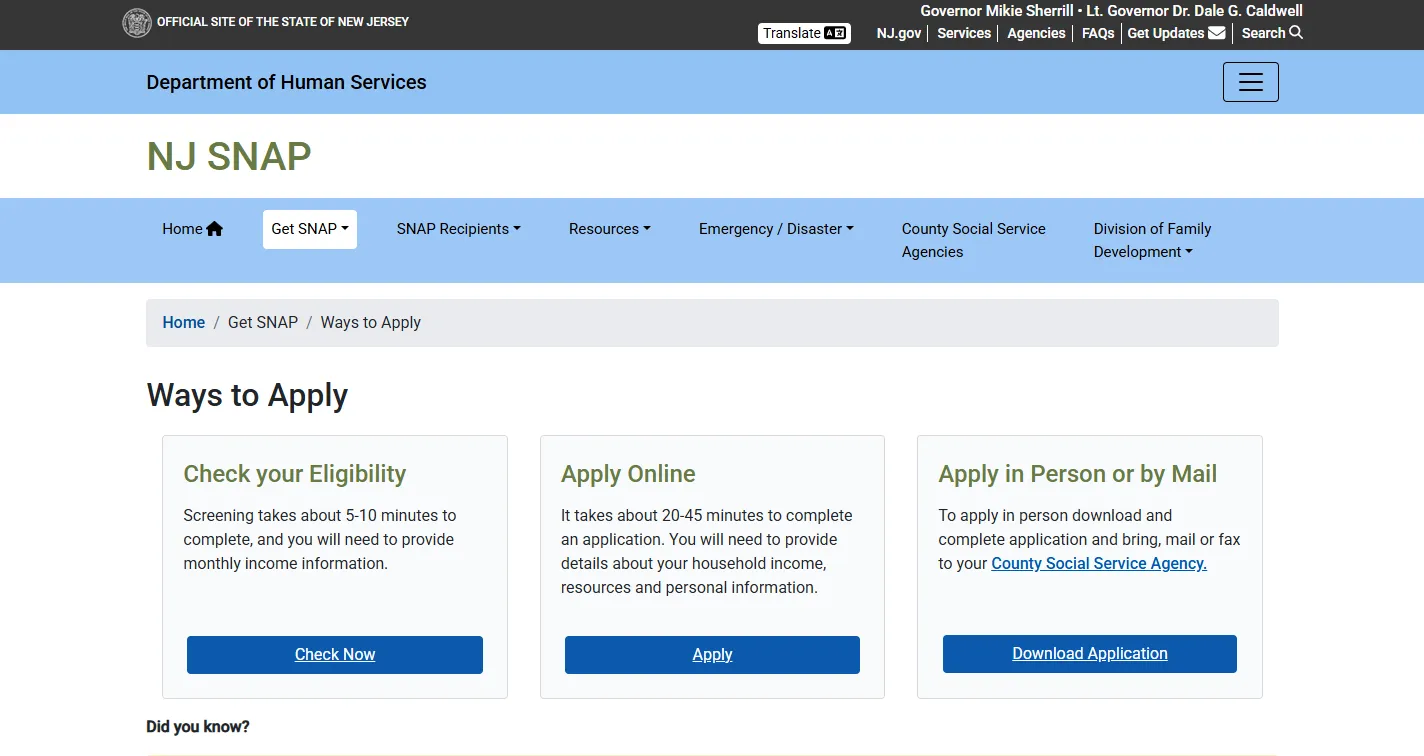
Official Site Screenshot: NJ SNAP Ways to Apply Page
The screenshot below shows the official New Jersey SNAP Ways to Apply page. Use it to confirm the real state application path before you enter private information, start a MyNJHelps application, or contact your County Social Service Agency.
How to use this official page
Open the official NJ SNAP Ways to Apply page, choose whether you want to check eligibility, apply online, or apply through a county agency, then follow the state link for the final action. If this screenshot and the live NJ page ever differ, follow the live NJ page.
NJ SNAP Application Route Finder
Choose your situation. This tool gives a safe official route without asking for your Social Security number, case number, income proof, EBT card number, PIN or private documents.
Start with NJHelps for screening or MyNJHelps for the application. Use official county or EBT routes for local help and card issues.
How to Apply for NJ SNAP: Step-by-Step
Use this workflow before starting the New Jersey food stamps application. It reduces wrong-form mistakes and helps you keep proof of every action.
Use NJHelps if you are unsure
NJHelps can screen for SNAP, WFNJ cash help and NJ FamilyCare/Medicaid. Screening is not final approval, but it can show whether applying is worth your time.
Start at MyNJHelps
Create or sign in to your account. Start the SNAP application, answer household questions, and submit when complete. Save confirmation proof.
Upload or send documents
Use the upload option when available. If your county requests mail, fax or in-person proof, send copies and keep proof of delivery.
Watch for county contact
You may need an interview or additional information. Read every notice and respond before the deadline.
Check case status
MyNJHelps can help you check case status, upload documents and see benefit details when your account is active.
Use Families First safely
If approved, benefits are accessed through a Families First EBT card. Protect your PIN and use official EBT tools.
MyNJHelps: What You Can Do After Creating an Account
NJ DHS says a MyNJHelps account can be used for several SNAP-related actions. Use this official portal instead of entering application details into a third-party form.
| Feature | What it helps with | User tip |
|---|---|---|
| Apply for SNAP | Start and submit a New Jersey SNAP application online. | Use accurate household, income and expense information. |
| Apply for WFNJ / Child Care | Some users may also apply for WorkFirst NJ or child care assistance. | Only select programs that match your household needs. |
| Check case status | See where your application or benefits stand. | Check after submitting proof or completing an interview. |
| Upload documents | Send verification through the online route when available. | Upload clear, readable files and keep screenshots or confirmations. |
| See benefit amount | Review benefit information once available. | Card balance should still be checked through official EBT tools. |
Always type the official MyNJHelps address yourself or use the state NJ SNAP page. Do not use search ads, social media links or random “application help” forms for private documents.
NJ SNAP Documents Checklist: What to Prepare
Exact documents depend on your household and county request. Prepare common proof early so you can upload or send copies quickly when asked.
Basic proof to gather
- Photo ID or another identity document.
- Social Security numbers if requested for household members.
- Proof of where you live, such as lease, rent letter, mail or utility bill.
- Immigration status proof if it applies.
- Any county notice, case number or appointment letter.
Money and cost proof
- Pay stubs, employer letter or recent tax records.
- Benefit award letters or unemployment information.
- Bank statements or resource proof if requested.
- Rent, mortgage, utility or shelter cost proof.
- Child care, child support or medical cost proof if requested.
Send copies, not originals, unless the county specifically tells you otherwise. Keep upload confirmation, fax confirmation, mail receipt, or a note with date, time and worker name.
County Social Service Agency Route: In Person, Mail or Fax
NJ SNAP applications and local case support may go through County Social Service Agencies. Use this route when you need local office help, paper application support, mail/fax instructions or county-specific questions.
Find your county agency
Choose the county where you live. Do not choose a county only because it is close to your workplace or a relative’s home.
Use exact county instructions
If you mail or fax paperwork, use the county address or fax number from the official state page or your notice.
Respond before the date
If the county asks for an interview or more documents, answer before the notice deadline to avoid delay or denial.
NJ SNAP Eligibility: What New Jersey Reviews
NJ SNAP eligibility depends on several factors, including household size, income, resources and other rules. The online screening tool can help, but only the official agency can make the final decision.
Who is applying together?
Be ready to list people in your household and explain who buys or prepares food together.
Income and resources
New Jersey reviews income, household size and resources. Do not guess eligibility from another state’s chart.
State supplement note
NJ SNAP states that New Jersey has a minimum monthly SNAP benefit amount of $95 for eligible households.
If you are unsure, screen or apply. Eligibility can depend on household facts, income type, deductions, age, disability, work rules, student rules and current policy.
After Approval: Families First EBT Card, Balance and Replacement
If approved for NJ SNAP, benefits are used through a Families First EBT card. Use official EBT tools for balance, PIN, transaction review, lost card, stolen card or replacement card issues.
Families First card
The card is used like a debit card at SNAP-authorized food retailers. Keep the PIN private.
ConnectEBT / NJFamiliesFirst
NJ DHS identifies NJFamiliesFirst.gov and ConnectEBT as official tools for NJ SNAP and WFNJ benefits.
Call quickly
For a lost, stolen or damaged card, call EBT Customer Service at 1-800-997-3333 or use official EBT tools.
NJ SNAP says your PIN should never be shared with anyone. Do not give your PIN to a caller, text message, social media account, unofficial app or application-help website.
Electronically Stolen Benefits and EBT Lock Safety
If your benefits are stolen electronically, act fast. New Jersey tells users to re-PIN or replace the Families First card and lock the card to protect remaining benefits.
Re-PIN or replace
Use official EBT customer service or official EBT tools immediately if you suspect card skimming or PIN theft.
Lock your card
Use official lock/unlock guidance to protect benefits when you are not shopping.
Check current replacement rules
NJ currently says SNAP/WFNJ benefits stolen electronically on or after December 21, 2024 are not eligible for replacement due to a federal budget change.
Stolen-benefit replacement rules can change. Use the official NJ page before relying on older advice from search results or social media.
NJ SNAP Materials and PDFs: What to Read Before Applying
New Jersey’s NJ SNAP materials page includes useful PDF flyers and handouts. These can help you understand MyNJHelps, SNAP work requirements, EBT lock/unlock, new chip/tap card information and program basics.
| Material | What it helps with | How to use it |
|---|---|---|
| MyNJHelps Flyer | Understanding the online application and portal route. | Read before creating an account or helping a family member apply. |
| EBT Card Lock/Unlock Flyer | Protecting the Families First card from unauthorized use. | Use with ConnectEBT or official card tools. |
| SNAP Facts: Work Requirements | Understanding possible work rules and exemptions. | Read if you receive a work-rule notice or county instruction. |
| New EBT Chip/Tap Flyer | Understanding newer card security and card-use changes. | Read if you receive or expect a chip/tap Families First card. |
Common NJ SNAP Application Mistakes That Delay Benefits
Small errors can create big delays. Use this checklist before submitting or responding to a county notice.
Application mistakes
- Using a non-official application website.
- Applying with the wrong address or county.
- Missing interview calls or appointment notices.
- Uploading blurry or incomplete documents.
- Ignoring county deadlines.
- Mailing originals instead of copies.
Better workflow
- Use NJHelps or MyNJHelps official routes.
- Save submission confirmations.
- Keep county notices in one folder.
- Check your portal after uploading proof.
- Call your county agency if a deadline is unclear.
- Use a SNAP Navigator if you need help applying.
Helpful FoodStampsOffice.org Guides for New Jersey Users
These confirmed internal guides support the same user task: NJ SNAP office routing, nearby office search, application workflow, hours, fax/document safety and statewide New Jersey food stamp office help.
Official New Jersey SNAP Links for Final Action
Use these official links only after reading the guide above. They are included for final action: applying, screening, county routing, EBT help, Navigator support and stolen-benefit guidance.
New Jersey Food Stamps Application FAQs
Quick answers for people searching how to apply for food stamps NJ, MyNJHelps SNAP application, NJ SNAP documents, county office help, EBT card replacement, case status and eligibility screening.
How do I apply for food stamps in NJ?
Use MyNJHelps.gov to apply online for NJ SNAP. You can also use a County Social Service Agency for in-person, mail, fax or local application help.
What is the official NJ SNAP application website?
The official online application system is MyNJHelps. Use NJ SNAP official pages to reach it safely.
Can I check NJ SNAP eligibility before applying?
Yes. NJHelps can screen for food assistance, cash assistance and health insurance. Screening is not final approval.
How long does the NJ SNAP online application take?
NJ SNAP says the online application usually takes about 20 to 45 minutes. Eligibility screening takes about 5 to 10 minutes.
Can I apply for NJ SNAP by mail or fax?
Yes, New Jersey provides county agency routes for in-person, mail and fax application options. Use the official County Social Service Agency page for your county.
What documents do I need for NJ SNAP?
Common proof may include identity, address, income, household, expenses, resources, immigration status if relevant, and any county notice or case information.
Can MyNJHelps upload documents?
Yes. NJ SNAP says a MyNJHelps account can upload documents, check case status, apply for benefits and see benefit amount.
Where do I find my New Jersey county SNAP office?
Use the official New Jersey County Social Service Agencies page and choose the county where you live.
How do I get help applying for NJ SNAP?
Use the NJ SNAP Navigator Program for free application help and questions about SNAP availability and requirements.
What is the NJ EBT customer service number?
For Families First EBT card help, call 1-800-997-3333 or use NJFamiliesFirst.gov / ConnectEBT official tools.
What if my NJ SNAP benefits were stolen electronically?
Immediately re-PIN or replace your Families First card and lock it to protect benefits. Check the official NJ stolen benefits page for current replacement rules.
Can FoodStampsOffice.org apply for NJ SNAP for me?
No. FoodStampsOffice.org is independent and cannot submit applications, check cases, approve benefits, replace EBT cards or accept private documents.
Final Recommendation
For a New Jersey food stamps application, start with NJHelps if you want to screen first, then use MyNJHelps to apply online. Use your County Social Service Agency for local application, mail, fax or in-person help. Use the SNAP Navigator Program if you need free help completing the application. Use NJFamiliesFirst, ConnectEBT or 1-800-997-3333 for Families First EBT card help.
Last updated: July 18, 2026. Recheck NJ SNAP before submitting, mailing, faxing or relying on application steps because official procedures and benefit rules can change.