
South Carolina Food Stamps Application: Apply for SNAP in SC
Need to apply for food stamps in SC? This guide explains the official South Carolina DSS application routes, online portal, county office option, mail/fax option, interview steps, documents, expedited SNAP, DSS phone help and EBT safety.
Quick Answer: How to Apply for Food Stamps in SC
South Carolina DSS says you may apply for SNAP benefits online, in person, or by mail or fax. The online route is the DSS Benefits Portal, also called SCCES. If you use paper, DSS says to submit the completed application to your county DSS office.
DSS Benefits Portal
Apply for SNAP and/or TANF, check eligibility, track an application and view benefit information through the official portal.
County DSS office
Apply in person or submit documents through your local county office. Confirm address and office rules before visiting.
Mail or fax
Complete the application, sign it, and send it to your county DSS office by the official route shown by DSS.
DSS Connect
Call SNAP/TANF Client Services at (800) 616-1309 for DSS Connect help, application routing and SNAP/TANF client services.
A SNAP application must at least include the name, address and signature of a responsible household member or authorized representative to be considered valid. Fill in as much as you can, but do not skip signing the application.
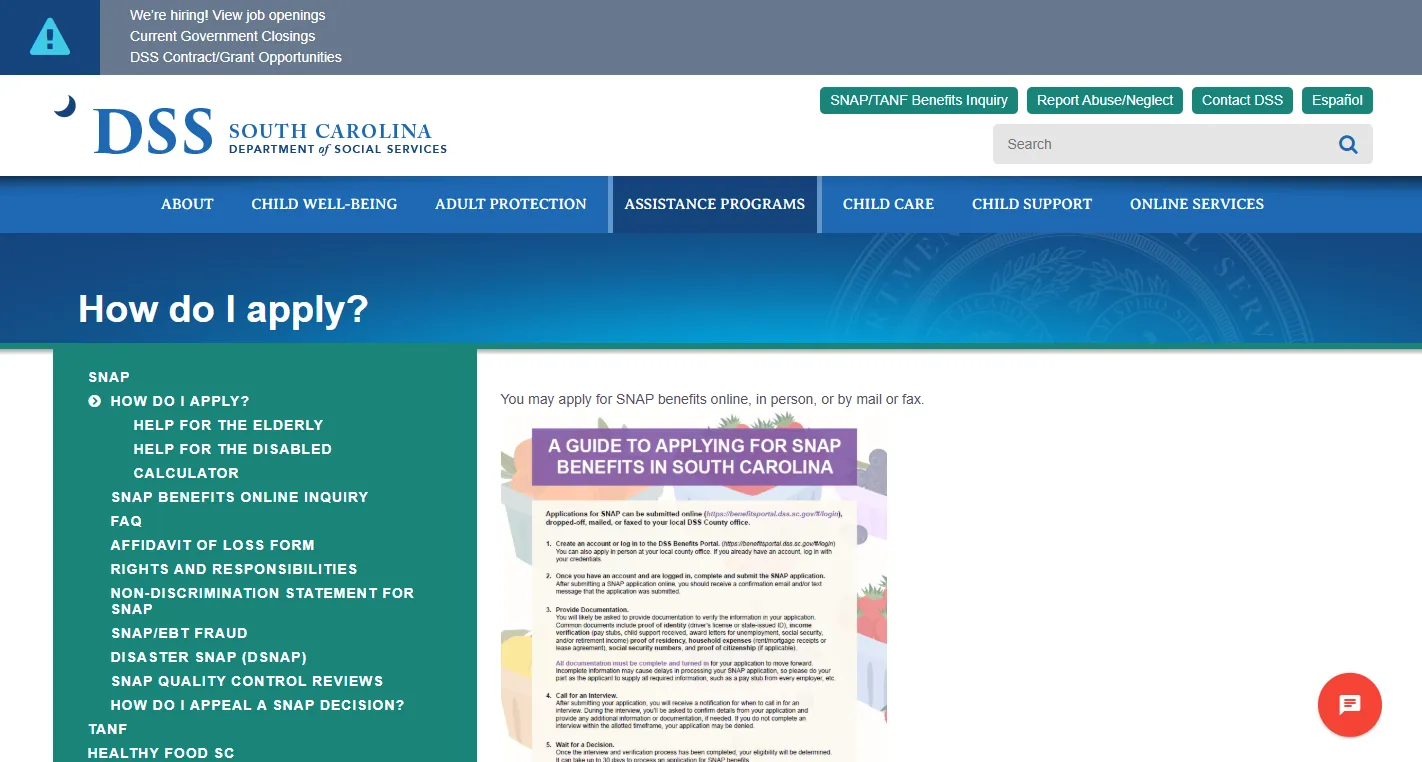
Official Site Screenshot: South Carolina DSS Apply for SNAP Page
The screenshot below shows the official South Carolina DSS page explaining how to apply for SNAP benefits. Use it to confirm the state source before applying online, going to a local office, or mailing/faxing a paper application.
How to use this official page
Open the DSS page, choose the route you need, and use the official portal or county office instructions. If the live DSS page and this screenshot ever differ, follow the live DSS page.
SC SNAP Application Route Finder
Choose your situation. This helper gives a safe South Carolina route without asking for your Social Security number, EBT card number, portal login, case number, PIN or private documents.
Use the DSS Benefits Portal to apply online, or use the DSS apply page to choose in-person, mail or fax application routes.
How to Apply for SNAP in South Carolina
South Carolina DSS gives four main application routes. Choose the one you can complete safely and keep proof of anything you submit.
| Application route | Best for | What to do |
|---|---|---|
| Online | Fastest self-service route for many users | Use the DSS Benefits Portal to apply for SNAP and/or TANF, check possible eligibility, track your application and view benefits. |
| In person | Users who need local help, printed forms, disability/language help or office equipment | Visit your local county DSS office. Confirm office address, hours and document rules before traveling. |
| Users who cannot use the portal or visit in person | Complete and sign the application, mail it to your county DSS office and keep proof of mailing. | |
| Fax | Users instructed to fax or using a county office fax route | Fax only to the official county DSS office fax number and keep the confirmation page. |
South Carolina DSS says qualified SNAP applicants begin receiving benefits within 30 days of the application. Some households and individuals need expedited benefits, which may begin within seven days of application.
DSS Benefits Portal: Online SNAP Application, Status and Upload Help
The DSS Benefits Portal is South Carolina’s online system for food and cash assistance. DSS describes it as a fast, easy and secure way to apply for benefits anytime and anywhere.
Apply for SNAP/TANF
Use the portal to apply for SNAP and/or TANF benefits. Complete the eligibility form if you want to see what benefits you may receive before applying.
Submit support documents
DSS says users can securely upload supporting documents such as pay statements, school/training verifications and proof of disability income.
Track application status
After applying, users can log into the portal 24/7 to track status and receive email notifications when submitted, approved or when more information is needed.
Official DSS Form 3800 PDF: Application Details Users Miss
The South Carolina DSS Form 3800 application packet includes important details that are easy to miss if you only read a short web page. These details can affect whether your application is valid, timely and complete.
Name, address and signature matter
- DSS says the application is valid as long as it contains the name, address and signature of a responsible household member or authorized representative.
- Print your name, print today’s date and sign the application.
- If signing with an “X,” follow the witness signature instructions on the form.
- Fill in all blanks you can. If you do not understand a question, a DSS worker can help.
Interview phone number timing
- After DSS receives your application, you will be given a phone number to call for an interview no later than 10 days from the date the application is received.
- You may request a face-to-face interview with a worker in the county where you live.
- You may bring someone with you to the interview who can help you.
- If an interpreter is needed, DSS says it will provide one at no cost.
7-calendar-day expedited screening
You may receive SNAP within 7 calendar days if your household meets expedited criteria, such as very low monthly gross income and limited liquid resources, rent/mortgage and utilities higher than combined monthly income and liquid resources, or a destitute migrant/seasonal farm worker situation.
Change reporting warnings
The application packet says certain changes must be reported. It lists SNAP changes such as gross income over 130% of the federal poverty level, ABAWD work hours falling below required levels, or lottery/gambling winnings at or above the listed threshold from a single game before taxes or withholdings.
South Carolina SNAP Documents Checklist
DSS may request verification to decide SNAP/TANF eligibility. A worker may request additional information during the interview, and you may mail, fax or drop off information at a DSS office.
Proof to prepare
- Identification for the person applying and authorized representative, if applicable.
- Names and details for everyone who lives with you.
- Information about people you do not want included because they do not purchase and prepare food with you.
- Social Security number or SSN application details for household members applying for SNAP.
- Citizenship or immigration status information for applicants when required.
Proof that may be requested
- Pay statements, employer statements or other income proof.
- School or training verifications if relevant.
- Proof of disability income if relevant.
- Cash, checking and savings account information.
- Rent, mortgage, lot rent, house taxes, house insurance or condominium fees.
- Heating, cooling or utility cost details.
Upload documents only through the official DSS Benefits Portal or submit them to DSS by official county office instructions. Do not send private IDs, SSNs, bank statements, benefit notices or EBT information to an independent guide website.
SNAP Interview, Status, Notices and Appeals in South Carolina
After applying, the interview and verification steps often decide whether the case moves forward or gets delayed. Watch the DSS portal, mail, email and phone instructions closely.
Interview help
Once your application is received, DSS says you will be given a phone number to call for an interview no later than 10 days from the application receipt date.
Track application status
Use the DSS Benefits Portal to track your SNAP/TANF application or call DSS Connect if you need client services help.
If you disagree
The DSS application packet says you may request a fair hearing orally or in writing for SNAP by contacting your county DSS office or the DSS individual/provider rights route.
South Carolina DSS lists SNAP/TANF Client Services at (800) 616-1309 through the DSS Connect Call Center. Constituent Services does not have access to SNAP/TANF case information, so use the SNAP/TANF route for case help.
County Office, Mail and Fax Route for SC SNAP Applications
If you do not apply online, DSS says to use your county office. The paper application packet also says you may mail, fax, email or take the application to DSS.
| Task | Best official route | What to keep |
|---|---|---|
| Find county DSS office | Use the official DSS local office link or call 1-800-616-1309. | Office address, phone, fax, date checked and staff instruction. |
| Mail paper application | Send completed and signed application to county DSS office. | Copy of application, mailing receipt and date sent. |
| Fax application or proof | Fax only to the official county DSS office fax number. | Fax confirmation page with date, time and fax number. |
| Drop off documents | Use the local county DSS office if this is the official route for your case. | Receipt, date stamp or staff confirmation if available. |
South Carolina EBT Card Safety, Replacement and Fraud Help
South Carolina DSS warns users to act quickly if benefits are stolen or a card is compromised. EBT card help is different from a SNAP application, so use the EBT route for card issues.
Call 1-800-554-5268
DSS says to call the 24-hour toll-free customer service line at 1-800-554-5268 to cancel your EBT card and protect benefits if electronic theft occurs.
Use ConnectEBT tools
DSS says the ConnectEBT mobile app and South Carolina EBT Cardholder Portal can help manage card protection options, alerts and card-use controls.
Create a new PIN
If you receive a replacement EBT card, DSS says you must create a new PIN before using it. The old PIN does not transfer to the replacement card.
DSS staff and EBT Customer Service representatives will never ask for your PIN. State agencies and EBT processors will never call or text you to ask for your EBT PIN or card number.
South Carolina DSS State Office Map
Use this map only for general South Carolina DSS orientation. SNAP applications, county offices, mail/fax routing and case actions should be confirmed through the official DSS website, county office, portal or notice.
Do not mail or fax your application to a random map address. DSS says paper applications should be submitted to your county office. Use the official local office route first.
People Also Search: Apply for Food Stamps SC Topics
These related searches are answered naturally because South Carolina users often need more than one step: application, office, phone, documents, EBT and status help.
Apply for food stamps SC online
Use the DSS Benefits Portal, not a paid third-party form.
South Carolina SNAP office near me
Use the DSS local office route and confirm county office instructions.
SC SNAP phone number
Use DSS Connect at (800) 616-1309 for SNAP/TANF client services.
South Carolina EBT card replacement
Call 1-800-554-5268 for lost, stolen, damaged or compromised EBT card help.
Helpful FoodStampsOffice.org Guides for SC SNAP Applicants
These confirmed internal guides support users who need application, office, phone, hours, documents and official-link help.
FoodStampsOffice.org Review & Trust Check
No fake ratings, fake testimonials, Review schema or AggregateRating schema are used on this page. This is an independent guide built to help users find the right official South Carolina DSS route.
Official-source-first
Application routes, phone numbers, EBT safety steps and document details are based on South Carolina DSS and official government sources.
Do not send private documents here
This website cannot receive SNAP applications, IDs, SSNs, bank records, EBT card numbers, PINs, notices or case documents.
Not South Carolina DSS
Only DSS can process applications, decide eligibility, issue notices, check case status or approve benefits.
Official South Carolina SNAP Links for Final Action
Use these official sources after reading the guide. The article gives the details; the links below are for applying, uploading, checking, contacting or confirming live DSS instructions.
South Carolina Food Stamps Application FAQs
Quick answers for users searching “apply for food stamps SC,” “South Carolina SNAP application,” “DSS Benefits Portal,” “SC SNAP phone number,” and “South Carolina EBT replacement.”
How do I apply for food stamps in South Carolina?
You can apply online through the DSS Benefits Portal, in person at a local DSS office, or by mail or fax using your county office route.
What is the online portal to apply for SNAP in SC?
The official online route is the DSS Benefits Portal, also called SCCES. It lets users apply for food and cash assistance programs.
Can I apply for South Carolina SNAP by mail or fax?
Yes. South Carolina DSS says you may apply by mail or fax by submitting the completed application to your county office.
What is the South Carolina SNAP phone number?
South Carolina DSS lists SNAP/TANF Client Services at (800) 616-1309 through the DSS Connect Call Center.
How long does it take to get SNAP in South Carolina?
DSS says qualified applicants begin receiving benefits within 30 days of the application. Some households may qualify for expedited benefits within seven days.
What makes a South Carolina SNAP application valid?
DSS Form 3800 says the application is valid if it contains the name, address and signature of a responsible household member or authorized representative.
What documents may DSS ask for?
DSS may ask for verification such as identity, household details, income, school/training information, proof of disability income, savings/checking information and housing or utility costs.
Do I need an interview for South Carolina SNAP?
After DSS receives your application, the Form 3800 packet says you will be given a phone number to call for an interview no later than 10 days from the application receipt date.
Can I get help if I need an interpreter?
Yes. The DSS application packet says you may request an interpreter and that DSS will provide one at no cost if needed.
How do I check my SC SNAP application status?
Use the DSS Benefits Portal to track your SNAP/TANF application. DSS also lists SNAP/TANF Client Services through DSS Connect at (800) 616-1309.
What number do I call for a lost or stolen South Carolina EBT card?
South Carolina DSS says to call the 24-hour toll-free customer service line at 1-800-554-5268 to cancel your EBT card and protect benefits.
Can FoodStampsOffice.org submit my South Carolina SNAP application?
No. FoodStampsOffice.org is independent and cannot process applications, check cases, approve benefits, replace EBT cards or accept private documents. Use South Carolina DSS for final action.
Final Recommendation
For a South Carolina Food Stamps Application, start with the DSS Benefits Portal if you can apply online. Use the official DSS apply page if you need in-person, mail or fax instructions. Use Form 3800 details to avoid missed signature, interview, expedited-service and document mistakes. Use DSS Connect at (800) 616-1309 for SNAP/TANF client services, and call 1-800-554-5268 immediately for lost, stolen, damaged or compromised SC EBT card help.
Last updated: July 18, 2026. Recheck South Carolina DSS before applying, mailing, faxing, visiting an office or relying on phone numbers because official procedures can change.