
Washington County Food Stamp Office: Apply, Renew & Get Help
Need SNAP help in Washington County, Tennessee? This guide gives the Johnson City TDHS office details, phone, hours, renewal route, One DHS upload steps, EBT support and official safety checks inside one mobile-friendly workflow.
Quick Answer: Washington County Food Stamp Office Help
For Washington County, Tennessee SNAP help, the official office route is the Washington County Family Assistance office in Johnson City. Use the office locator for address, phone, fax and hours; One DHS for online application, renewal, document upload, case status and appeals; and Tennessee EBT Customer Service for card problems.
Washington County TDHS
2557 Plymouth Road
Johnson City, TN 37601
One DHS Contact Center
Call +1(833) 772-8347 for SNAP, appointment, notice, case and Family Assistance routing. TTY users can use 711.
Office hours
TDHS lists Washington County office hours as 8:00 am to 4:30 pm. Confirm before visiting.
Washington County fax
The official locator lists fax +1(423) 434-6974. Fax only if TDHS or your notice says fax is accepted.
If you need to apply, renew, upload verification, check case status, update household/contact information or file an appeal, start with One DHS. Use the Johnson City office visit route only when your task truly needs in-person help.
Official Site Screenshot: Washington County TDHS Office Locator Page
The screenshot below shows the official Tennessee DHS Family Assistance office locator area for Washington County. Use it to visually confirm the state source before relying on address, phone, office hours, fax or listed services.
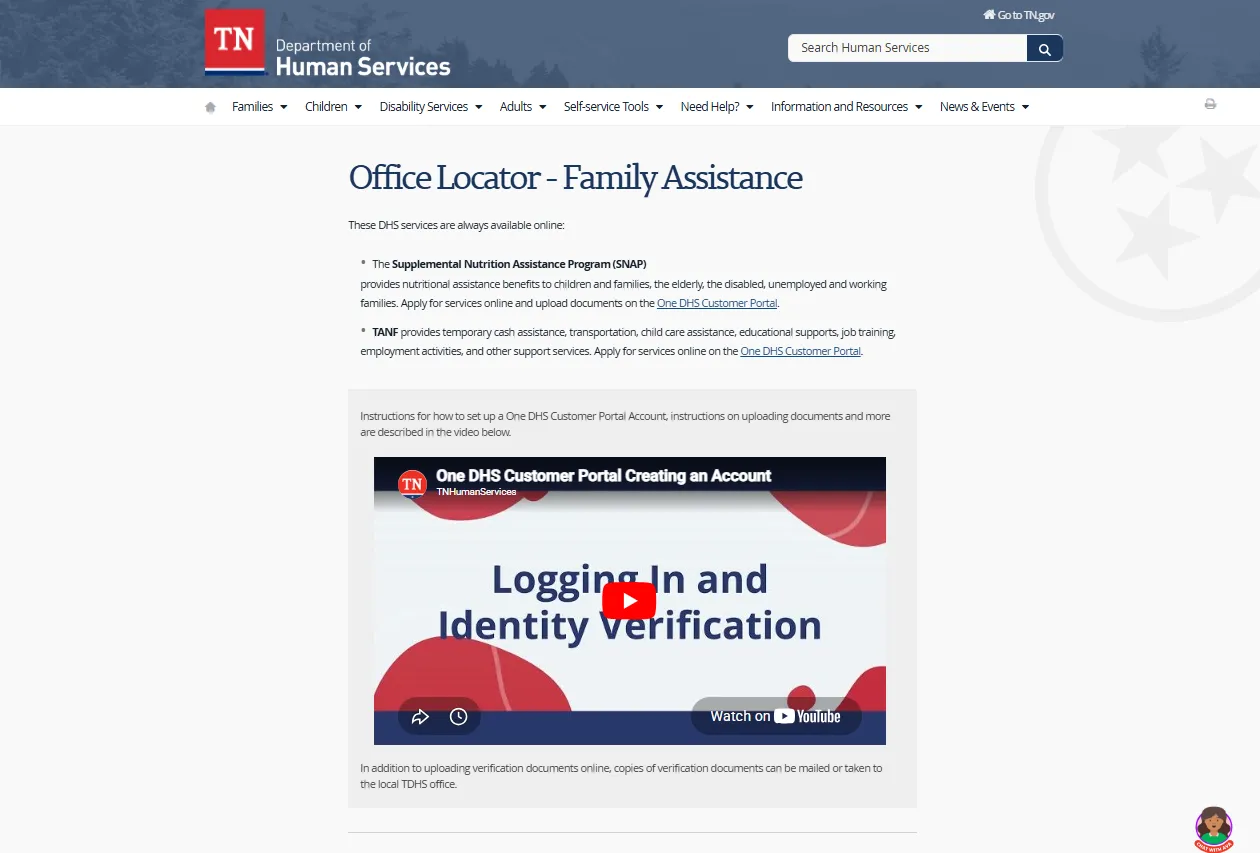
How to use this official page
Open the TDHS Family Assistance Office Locator, search for “WASHINGTON COUNTY,” then confirm the live address, phone number, fax, office hours and services before calling, visiting, mailing or faxing. If the live TDHS page and this screenshot ever differ, follow the live TDHS page.
Washington County Food Stamp Office: Address, Phone, Hours and Services
The official Tennessee DHS locator lists the Washington County Family Assistance office as the county route for Food Stamp/SNAP and related benefit services.
| Office detail | Official listing detail | Best user action |
|---|---|---|
| County office | WASHINGTON COUNTY, Dist. 1, Cty. #90 | Use for Johnson City and Washington County SNAP / Family Assistance help. |
| Street address | 2557 Plymouth Road, Johnson City, TN 37601 | Use for directions only after confirming the issue needs an office visit. |
| Office hours | 8:00 am – 4:30 pm | Confirm same-day hours, holidays, weather closures and lobby rules. |
| Phone | +1(833) 772-8347 | Use the One DHS Contact Center for SNAP, renewal, interview, notice, case and routing questions. |
| Fax | +1(423) 434-6974 | Fax only if TDHS, One DHS or your notice says fax is accepted. Keep proof. |
| Listed services | Food Stamp, Families First, Child Care Certificate, Medicaid and TennCare | Ask TDHS which program route applies before sending private documents. |
Washington County SNAP Route Finder: Apply, Renew or Get Help
Choose what you need. This tool gives a safe TDHS route without collecting your Social Security number, EBT card number, case number, PIN or documents.
Confirm the Washington County office on TDHS, then call before visiting.
How to Apply, Renew or Recertify SNAP in Washington County
Tennessee DHS directs users to the One DHS Customer Portal for many SNAP actions. A typical SNAP route includes application or renewal submission, eligibility interview, verification documents and monitoring notices.
Use One DHS
Use OneDHS.tn.gov to apply, upload documents, check status, review notifications, update household/contact information and file appeals.
Open One DHSFollow your renewal notice
Renewal and recertification are case-specific. Use One DHS or the instructions in your official TDHS notice before the deadline.
Mail only when needed
If you need paper forms, use TDHS instructions and keep copies. TDHS mail routes and forms can change, so confirm before mailing.
Do not wait to apply just because all documents are not ready. Apply through an official route, then upload or submit verification as soon as possible. Missing an interview or document deadline can delay or close your case.
One DHS Document Upload: What Washington County Users Should Do
One DHS can be used to upload, submit and view documents related to services. This is often faster and safer than faxing or mailing when you have a phone photo, scan or file ready.
Use the correct case/application
- Sign in through the official One DHS route.
- Choose the correct SNAP or Family Assistance case/application.
- Select the correct document type if the portal asks.
- Upload clear photos or files from your phone, tablet or computer.
- Check submission history or confirmation when available.
Document mistakes
- Uploading documents to unofficial guide pages.
- Sending original records by mail when copies would work.
- Faxing without a confirmation page.
- Choosing the wrong case/application in the portal.
- Assuming documents were processed just because they were sent.
Keep screenshots, upload confirmations, fax confirmation pages and mailing receipts. If a deadline is close, use One DHS or call TDHS to confirm whether the verification was received and processed.
SNAP Document Checklist for Washington County Applications and Renewals
Your exact proof depends on your household and TDHS notice. The items below are common verification categories users may need for an application, renewal, recertification or document request.
Prepare these first
- Identity proof, such as driver’s license, school/work ID, birth certificate, passport or other accepted record.
- Proof of where you live, such as utility bill, lease, rent receipt, mail, mortgage or property-related record.
- Income proof, such as pay stubs, employer statement, award letters, unemployment, disability, retirement or benefit records.
- Social Security number proof if requested.
- Any official TDHS notice, case number or One DHS message.
Costs that may matter
- Rent, mortgage, property tax or property insurance proof.
- Utility costs such as power, gas, water or phone if requested.
- Child care costs and child support payments.
- Medical expenses for elderly or disabled household members when relevant.
- Bank/resource records when TDHS asks for them.
Submit only what TDHS asks for through an official route. Private records should go to TDHS, One DHS, EBT support or instructions from your official notice — not to third-party pages.
Interview, Case Status, Renewal Notice and Appeal Help
After applying or renewing, the most important tasks are watching notices, completing the interview, submitting proof and checking whether TDHS needs anything else.
Complete the interview
If your SNAP application or renewal requires an interview, complete it quickly. If you miss an interview, call the One DHS Contact Center to ask about completing or rescheduling.
Use One DHS dashboard
Use One DHS to check case status, review notifications, update household/contact information and monitor appeal or application actions.
Disagree with a decision?
If you think a case decision is wrong, use the appeal route shown by TDHS or One DHS. Appeals are case-specific, so keep notices and dates.
Tennessee EBT Help for Washington County SNAP Users
For lost, damaged, stolen or compromised EBT cards, use Tennessee EBT Customer Service. For case eligibility or renewal questions, use One DHS or TDHS instead.
EBT Customer Service
TDHS lists Tennessee EBT Customer Service at +1-888-997-9444 for EBT card support, including lost, damaged, stolen or compromised cards.
Open Tennessee EBT pageUse official card tools
Use official Tennessee EBT/ebtEDGE routes for balance, transaction monitoring, PIN changes, account freezing and replacement card tools.
Never share your PIN
TDHS will not need your EBT PIN by phone, text or social media. Report suspicious activity quickly and change your PIN if your card may be compromised.
Stolen SNAP Benefits, Card Skimming and Fraud Safety
If benefits are stolen or your EBT card is compromised, act quickly. Do not wait for the next benefit month if you see suspicious transactions.
Call EBT support
Call +1-888-997-9444 to report a lost, damaged, stolen or compromised card and ask about replacement steps.
Use One DHS if applicable
Use official One DHS options for reporting stolen SNAP/TANF benefits if that route appears for your situation.
Protect the new card
Change your PIN, review transactions and avoid using obvious PINs. Check card-protection options in official EBT tools.
Map and Directions to Washington County TDHS in Johnson City
Use this map for route planning only. The official TDHS locator, One DHS portal and your TDHS notice should guide applications, renewals, document submission, interviews and deadlines.
If you are driving from Jonesborough, Gray, Oak Grove, Telford, Limestone or nearby Washington County communities, call first. Many SNAP tasks can be completed through One DHS or the Contact Center without an office trip.
Visit, Call, Use One DHS, Mail or Fax?
Choose the route that matches your task before spending time driving, waiting on hold or sending documents to the wrong place.
| Task | Best route | Why it helps |
|---|---|---|
| New SNAP application | One DHS Customer Portal | Online filing lets you apply and use account tools without an office trip. |
| Renewal or recertification | One DHS or TDHS notice | Renewal steps are case-specific and deadline-based. |
| Upload documents | One DHS upload route | Upload clear copies and keep confirmation when available. |
| Confirm office details | TDHS Family Assistance Office Locator | Official locator details are safer than map-only or older directory listings. |
| Missed interview | One DHS Contact Center | Use +1-833-772-TDHS (8347) to ask about completing or rescheduling. |
| Lost or stolen EBT card | Tennessee EBT Customer Service | Card replacement and PIN/card issues are handled by EBT support. |
| Fax documents | Fax only if instructed | Wrong faxing can delay processing. Keep the fax confirmation page. |
Helpful FoodStampsOffice.org Guides for Washington County Users
These related guides support the same user task: Washington County/Johnson City office help, Tennessee SNAP routes, nearby East Tennessee guides, office-hour checks and fax/document safety.
Official Tennessee SNAP and TDHS Links
Use these official sources for final action. This article explains the route, but TDHS, One DHS, Tennessee EBT and USDA control applications, renewals, document handling, eligibility and card support.
Washington County Food Stamp Office FAQs
Quick answers for users searching Washington County SNAP office, Johnson City TDHS, application, renewal, phone number, hours, documents, EBT and official case help.
Where is the Washington County Food Stamp Office?
The official Tennessee DHS office locator lists the Washington County Family Assistance office at 2557 Plymouth Road, Johnson City, TN 37601.
What is the Washington County SNAP office phone number?
The Washington County listing shows +1(833) 772-8347, also written by TDHS as +1-833-772-TDHS (8347).
What are the Washington County TDHS office hours?
TDHS lists Washington County office hours as 8:00 am to 4:30 pm. Confirm before visiting because closures and service procedures can change.
What is the Washington County TDHS fax number?
The official TDHS locator lists the Washington County fax as +1(423) 434-6974. Fax documents only if TDHS or your notice tells you to use fax.
Can I apply for Tennessee SNAP online?
Yes. Use the official One DHS Customer Portal for SNAP applications and account actions in Tennessee.
How do I renew SNAP in Washington County?
Use One DHS or follow the instructions in your official TDHS renewal notice. Renewal, recertification and change-reporting steps can be case-specific.
How do I upload SNAP verification documents?
Use the One DHS portal upload route when available, choose the correct case/application, upload clear copies, and keep confirmation proof.
What documents should I prepare for SNAP?
Common proof may include identity, address, income, Social Security number, rent/mortgage, utilities, child care, child support, resources and medical costs for elderly or disabled household members when requested.
What if I missed my SNAP interview?
Call the One DHS Contact Center at +1-833-772-TDHS (8347) to ask about completing or rescheduling the interview. Keep your notice nearby.
What number do I call for a lost Tennessee EBT card?
TDHS lists Tennessee EBT Customer Service at +1-(888)-997-9444 for lost, damaged, stolen or compromised EBT cards and card support.
Can FoodStampsOffice.org check my Washington County SNAP case?
No. FoodStampsOffice.org is an independent guide and cannot check case status, approve benefits, upload records or replace EBT cards. Use One DHS, TDHS or official EBT support.
Is the Johnson City Food Stamp Office the same Washington County office?
For this Tennessee article, yes. The Washington County office listed by TDHS is in Johnson City at 2557 Plymouth Road.
Final Recommendation
For Washington County Food Stamp Office help in Tennessee, start with the official TDHS office locator for the Johnson City office, then choose the right action: One DHS for applications, renewals, uploads, case status and appeals; the One DHS Contact Center for interview or notice questions; and Tennessee EBT Customer Service for lost, damaged, stolen or compromised card problems.
Last updated: July 10, 2026. Recheck Tennessee DHS before visiting, faxing documents, mailing copies or relying on office hours, because official procedures can change.